
End-to-end AI training platform for businesses

What if training built & updated itself?

Standardized video training in any language, across your whole workforce — in days, not years. Hand us your SOPs and your senior operator's phone video. We hand you back a finished, standardized training system.

input.raw.data Raw capture BETA Phone video, audio, screen recording, or any document input.docs Your documents SOPs, manuals, slides, PDFs prometheus.engine The build. Our AI engine takes your inputs and produces professional video courses. Delivered in days. central.hub Learning Management System (LMS) + AI-organized knowledge graph your team can chat with — a living second brain for your whole operation. kb.ai.search · chat · synthesize out.auto-updated Auto-updated in 48h Process changed? Live everywhere inside two days. out.multi-languages Multi-languages 75+ One source. Every market. Translated. out.compliance Compliance toolkit Records, certificates, audit-ready. out.metrics Tracking, analytics & records Who watched, what they got, where the gaps are. out.in-task In-task guidance BETA SOPs delivered at the moment of the task. out.quiz Quizzes & certifications Proof of competence — not just attendance.
5–10d
First version
75+
Languages
48h
Updates are live
100%
Audit-ready
Before · after

Hand us the raw. Get back the polished.

Your SOP from page 47 of the binder — before, and after we've put the system to work.

Voice Memos
SOP-4.2 walkthrough.m4a
Today · 03:42 · 8.4 MB
01:24 / 03:42
◀◀ ▶▶
"…and then you check the lockout tag…"
9:41 ●●● 100%
IMG_4729.MOV
Senior operator recording a walkthrough OFF · LOCKED DANGER DO NOT OPERATE
00:4202:47
"OK so what you do is, you grab the lockout…"
SOP — Lockout / Tagout 4.2
Standard Operating Procedure
Health & Safety Dept.
Lockout Tagout 4.2 Doc No. LOTO-4.2
Rev. 3 — Eff. 01/2024Page 1 of 1
DO and DON'T Do Lockout Tagout
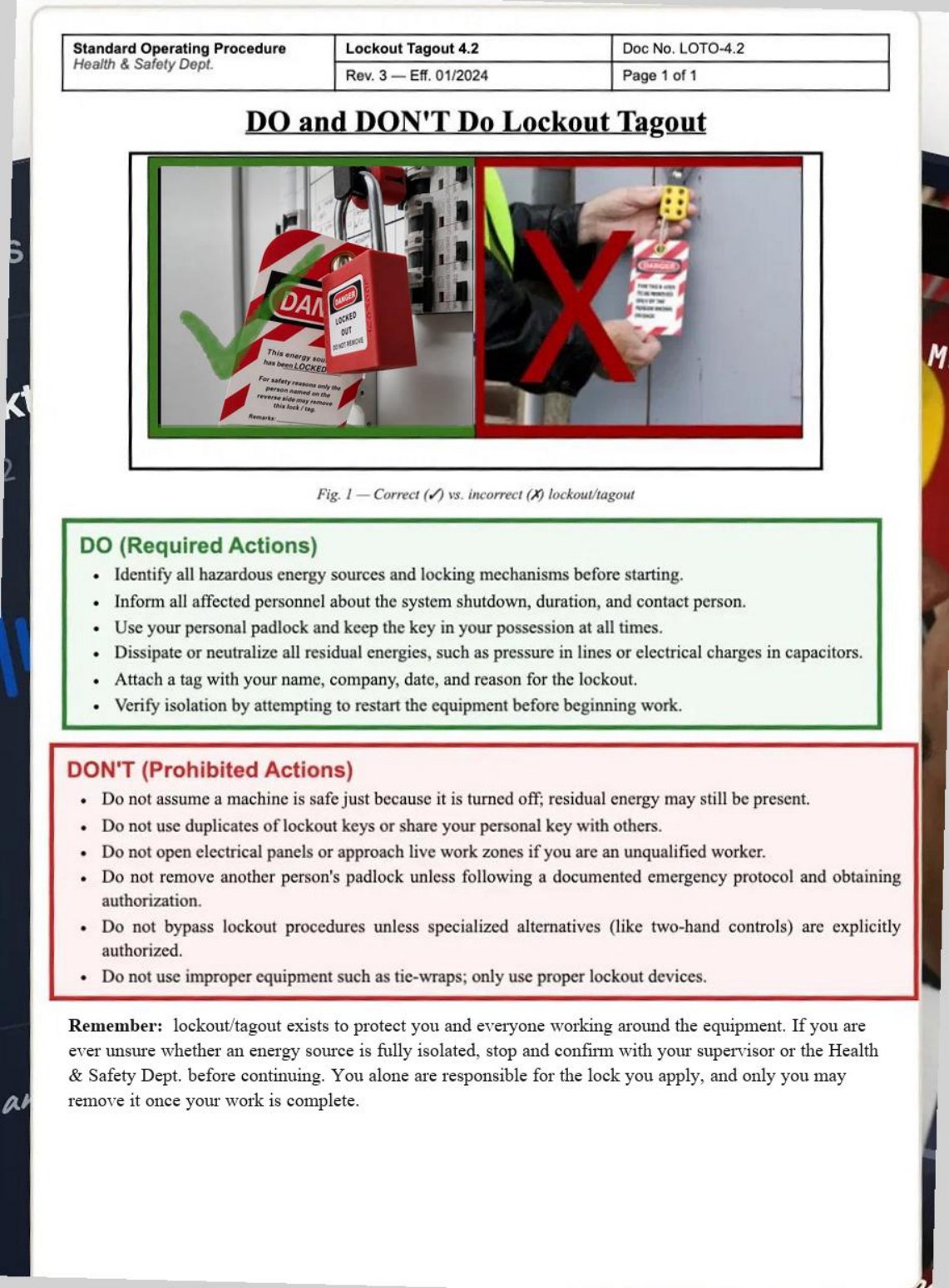
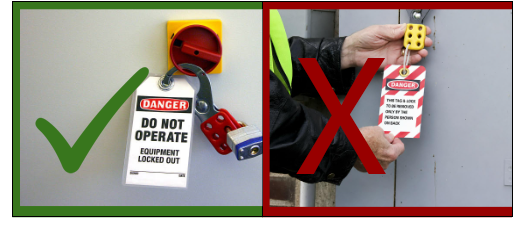
Fig. 1 — Correct (✓) vs. incorrect (✗) lockout/tagout
DO (Required Actions)
  • Identify all hazardous energy sources and locking mechanisms before starting.
  • Inform all affected personnel about the system shutdown, duration, and contact person.
  • Use your personal padlock and keep the key in your possession at all times.
  • Dissipate or neutralize all residual energies, such as pressure in lines or electrical charges in capacitors.
  • Attach a tag with your name, company, date, and reason for the lockout.
  • Verify isolation by attempting to restart the equipment before beginning work.
DON'T (Prohibited Actions)
  • Do not assume a machine is safe just because it is turned off; residual energy may still be present.
  • Do not use duplicates of lockout keys or share your personal key with others.
  • Do not open electrical panels or approach live work zones if you are an unqualified worker.
  • Do not remove another person's padlock unless following a documented emergency protocol and obtaining authorization.
  • Do not bypass lockout procedures unless specialized alternatives (like two-hand controls) are explicitly authorized.
  • Do not use improper equipment such as tie-wraps; only use proper lockout devices.
UNCONTROLLED WHEN PRINTED · verify current revision before use · F-4.2

Before · what you give us

A SOP binder. A phone clip from your senior operator. A voice memo or screen recording. Whatever lives in folders and pockets today.

After · what your team sees

Finished module. Captions. Quizzes. Certificate. In any language.

The problem

You already have the expertise. It's just not reaching every employee.

The knowledge lives in your senior people, your binders, a slide deck nobody's opened since 2022. It just never makes it to the floor.

01where it lives
input.sop
Your SOPs
Manuals, slides, PDFs.
input.binder
The binder
Shelf nobody opens.
input.senior
Senior people
In their heads only.
×the bottleneck
knowledge.stuck
It all piles up here.

Every source funnels in. Nothing standardized comes back out to the floor.

never reaches the workforce
02so the floor gets
onboarding.repeat
Onboarding never stops
over and over

Trained by whoever's available, and the clock restarts with every turnover.

Fix · live in days Video courses from your SOP
language.gap
Half-understood language
lost in translation

People learn by watching and hoping, and safety-critical steps get lost in translation.

Fix · 75+ languages Multi-language, 75+
proof.missing
“Completed” isn't “understood”
no proof

“Everyone was trained” is not proof, and a sign-off is not competence.

Fix · proof, not sign-off Quizzes & certifications
compliance.stale
Compliance never up to date
no warning

SOPs go stale the moment they're printed, and audits become fire drills.

Fix · audit-ready, always Compliance toolkit

We unclog the middle. The same training reaches every employee, in every language.

See it in action
How It Works

Most of the work is ours.

Deployed in six steps.

Step 1 / 6 You

You hand us your material

SOP binders, phone clips, voice memos, slide decks, PDFs, whatever you already have. No script, no studio.

First draft back within 48 hours.
Voice Memos
SOP-4.2 walkthrough.m4a
Today · 03:42 · 8.4 MB
01:24 / 03:42
◀◀▶▶
“…and then you check the lockout tag…”
9:41●●● 100%
IMG_4729.MOV
Raw phone clip of an operator walkthrough
00:4202:47
“OK so what you do is, you grab the lockout…”
Standard Operating ProcedureHealth & Safety Dept.
LOTO-4.2Rev. 3 · 01/2024
Lockout / Tagout · Energy isolation
DO (Required Actions)
  • Identify all hazardous energy sources before starting.
  • Use your personal padlock and keep the key in your possession.
  • Attach a tag with your name, company, date, and reason.
  • Verify isolation by attempting to restart the equipment.
DON'T (Prohibited)
  • Never remove another person's padlock without authorization.
  • Never use tie-wraps in place of proper lockout devices.
Uncontrolled when printed · Page 47 of 212
REV. 3
P safety_training_2019.pptx34 slides · 18.2 MB
Step 2 / 6 Us

We turn it into your script and video

A script with the narration, slide by slide, and the finished video built from it. You get both at once, in every language.

Script and video, in days.
TalentED Studio · LOTO-4.2 Render · Done
Script · EN master12 slides
03

Switch the disconnect to OFF and apply your personal padlock.

04

Verify isolation by attempting a restart before any work begins.

Narration recorded · 0:19
05

Attach a tag with your name, company, and the date.

Video frame: technician at the machine Slide 04
Verify isolation by attempting a restart.
02:1306:48
EN ✓FR ✓ES ✓ Draft v1 · delivered Tue 09:12
Step 3 / 6 You

You review & approve

You read the script, watch the video, and apply the changes you need. We re-render your edits, and nothing goes live until you sign off.

Nothing goes live until you sign off.
Review & approve · LOTO-4.2 Awaiting sign-off
Script · Slide 06
Lower the guard and clear the area before restart.
Run the 6-point check before removing your lock.edited1
MT
M. Tremblay · Plant 2 · Today 14:12

“We moved to a 6-point check last fall. Please update this line.”

Edit applied · re-rendered
LOCKOUT / TAGOUT · SLIDE 06 The 6-point check Before removing your lock
04:51/ 06:48CC
2 comments · 2 resolved
Step 4 / 6 You

You deploy in your LMS by profile

Build each path once per role, then one click assigns it by employee profile: site, role, language.

Build the path once; send by role.
Path builder · New hire ramp Line Operator
Path · 4 modules · 40 min
1Plant orientation12 min · video + quiz
2PPE essentials8 min · video + quiz
3Lockout / TagoutLOTO-4.2 · 9 min · video + quiz
4Line startup & handoff11 min · video + quiz
Built once for this role.
Role
Line Operator
Sites
Plant 1 ✓Plant 2 ✓Plant 3 ✓
Language
ENFRES
Matched to each employee profile.
JDALRP+24 27 employees match
Step 5 / 6 Your team

They learn and work on it

Branded platform, any device, in their language, with answers at the task.

Any device, their language, answers at hand.
9:41●●● 100%
Lakeshore Metals AcademyMarco · Plant 2 · Line Operator
MODULE 3 · LOCKOUT / TAGOUT Apply your personal lock
CCUse your personal padlock and keep the key with you.
ENFRESCaptions & audio
Module 3 of 743%
?Up next · Quiz, 4 questions
Rewatch · Verify isolation0:42 · Module 3
LearnPathsHelp
Any device EN · FR · ES
Step 6 / 6 Together

It stays current

Every change goes back through the same review & approve gate, then refreshes within 48 hours.

Refreshed within 48 hours.
Versions · LOTO-4.2 Live everywhere
v4.2CurrentLive today · 16:40
Process changed · Step 6 now uses a 6-point check
Through the review & approve gate · M. Tremblay
Live everywhere · refreshed within 48h
EN ✓FR ✓ES ✓all languages updated
v4.1SupersededLive Mar 12
Step 6 · 5-point check (replaced by v4.2)
v4.0OriginalLive Jan 8
First capture · built from your binder, clips and memos
Next change? Same gate: review, approve, then live within 48 hours.
See it in action
Compare

Three ways to build training. One finishes the job.

Same goal, three very different paths — here is how the cost, speed, and ownership actually compare.

Dimension

DIY AI video software

Synthesia · HeyGen · Colossyan

Video & e-learning agency

Custom production studios

Done-for-you

Your training, fully produced & hosted.

Cost per hour of finished content

Cost per hour of finished content
DIY AI video softwareLow license, endless labor — every script, edit and QA is yours.
Video & e-learning agency$5,000–$50,000+ per finished hour
TalentEDA single done-for-you price — and it undercuts both.

Time to first finished course

Time to first finished course
DIY AI video softwareWeeks to months — even years, depending on scope.
Video & e-learning agencyWeeks to months — even years for a full program.
TalentED5–10 days

Who does the work

Who does the work
DIY AI video softwareYour team — script, design, edit, QA
Video & e-learning agencyAgency produces; you manage & fund
TalentEDDone for you — no internal team

Languages & translation

Languages & translation
DIY AI video softwareDIY per language; quality on you
Video & e-learning agency$300–$1,000+ per language, per video
TalentED75+ languages, translated, included

Update when a process changes

Update when a process changes
DIY AI video softwareYou re-script & re-render — every language
Video & e-learning agency$2,000–$5,000 per reshoot; weeks
TalentEDLive in 48h, re-translated everywhere

Compliance & audit-readiness

Compliance & audit-readiness
DIY AI video softwareNot included — separate build
Video & e-learning agencyNot included — separate build
TalentEDBuilt in — records, certs, audit trails

Branded LMS & hosting

Branded LMS & hosting
DIY AI video softwareNot included — buy & host a separate LMS, ~US$4–$10/user/mo
Video & e-learning agencyNot included — buy & host a separate LMS, ~US$4–$10/user/mo
TalentEDIncluded — your logo, your domain

Pricing model

Pricing model
DIY AI video softwareCheap subscription — but your team's labor is the real cost.
Video & e-learning agencyPer project, per minute, per reshoot.

Competitor figures are typical industry estimates. A branded enterprise LMS (Cornerstone, Docebo, SAP Litmos, TalentLMS) is mostly quote-only at ~$4–$10/user/month. Sources: Cubite LMS Market Share 2026; vendor pricing pages; ITQlick; Educate-Me (2026).

One platform

Video production is just one piece.

Agencies and AI tools hand you a file. TalentED hands you the whole platform it runs on.

+ 10 more capabilities

Free training cost audit

What this actually saves you.

Five inputs, your industry’s benchmarks for the rest — see where every recovered dollar comes from.

Estimated annual savings
$0

recovered from $0 of annual training & turnover cost.

Total recovered $0 across 4 drivers
Recovered / yr
$0
total savings TalentED unlocks
Recovered-spend ratio Recovered savings as a share of your current annual training & turnover cost.
0%
share of spend you reclaim
Per employee
$0
recovered, per head / yr
Annual cost base
$0
addressable training & turnover
Where the savings come from Hover a driver to see the methodology.

DIRECTIONAL ESTIMATE — Book a walkthrough for a costed model with your actual numbers.

Pricing

A custom quote in 24 hours.

No two projects are the same size — a handful of processes or your whole catalog, one language or fifteen, built from scratch or from what you already have. A list price would always be wrong, so we scope yours against your headcount and your content and come back with a real number inside one business day. No form, no week-long wait.

Get your quote →
24hQuote turnaround
CustomScoped to your project
YoursEvery course & asset
FAQ

The honest answers.

How fast can you really turn around a course?
First version in 5–10 days from the day you hand us the source. Revisions inside that. We've shipped same-week for clients with clean source material. We're slower if your SOPs need to be reverse-engineered from a senior person's head — but we do that work too.
Who owns the content?
Your source material and all your learner data are yours, full stop. We produce and finance your course library as part of your subscription — it lives on TalentED, always current, version-locked, and translated into 75+ languages. Yours to use throughout your agreement, and yours to take once the production is fully settled.
What does "updates live in 48 hours" actually mean?
Process changed? Your SOP already lives in the platform — edit it there, or just click Update, and that's the only trigger. Within 48 hours the affected segments are rebuilt, re-translated in every language, routed through your sign-off, and live to every worker — and anyone still on the old version is flagged for re-training. It all happens inside the LMS. No requeue. No project plan. No quarterly release cycle.
Does it integrate with our HRIS / SSO?
SAML/OIDC SSO and SCIM provisioning are available in beta, with webhooks into your HRIS for hire/leave events. We'll be straight about what's live today versus on the near-term roadmap, and set it up with your IT team during onboarding.
What about security and compliance?
Encrypted in transit and at rest, with role-based access, audit logs, and retention controls by default — GDPR-aligned, with regional data residency on request. Our SOC 2 certification is in progress: we won't claim a certification we don't yet hold, and we share our current security documentation under NDA.
What if our experts don't know how to be on camera?
That's the whole point. They don't have to be. Hand it to your best person. Press record. We do the rest — including, when needed, replacing their on-camera delivery with an AI presenter while keeping their words and their expertise.

See all questions →

Train every employee like
your best one.

"Excellence is teachable."

Twenty minutes. We'll look at one process you'd want standardized, and you'll see a sketch of the course we'd build — before the call ends.