From your binder to your branded platform - in days, not quarters.
You hand over source material and set the direction. We capture, produce, translate, and deploy - then keep it current. Most teams see their first finished course in days and go live shortly after.
YOU DIRECT · WE PRODUCE · WE DEPLOY · ALWAYS CURRENT
The path, end to end
1
You
Hand over source material
SOPs, phone clips, voice memos, slides, PDFs - and tell us which sites and languages.
2
TalentED
We produce & translate
We turn it into your courses - script and finished video together - in every language you need, and you review and approve.
3
Together
Connect, assign & go live
Wire it to your stack, build a path per role, then push one standard to every site at once.
4
Ongoing
Stay current automatically
Update the source once and the courses, records and proof refresh - within 48 hours, audit-signed.
You direct, we build · first version in days · live shortly after
1
Pilot
We prove it on one workflow, with success criteria you set - your current setup untouched.
2
Scale
Path A (replace your LMS) or Path B (start fresh) - we produce, migrate and deploy.
3
Go-live
One standard pushed to every site, shift and language at once.
✓
Always current
Update the source once; everything refreshes within 48 hours.
How you come on board
Start with a pilot. Then the path that fits where you are.
Every engagement starts the same way - a pilot on one high-priority workflow, with success criteria you set, while everything you run today stays exactly as it is. Once it proves out, the rollout follows one of two paths: whether you’re replacing a learning platform, or standing one up for the first time.
0
First, a pilot - nothing changes for your people
We build one real course from your own material and agree what “good” looks like before anything rolls out - completion, time-to-competency, manager feedback. Your current setup is untouched. Only when the pilot lands do we scale, on whichever of the two paths below fits you.
Then, one of two paths
Path A · You already run an LMS
Replacing a platform
A managed switch with no gap in service - your current system keeps running until ours is proven.
1
Parallel run
Your current LMS keeps running - nothing is switched off. We build and populate TalentED alongside it.
2
Migrate content & records
We bring your existing courses across and import your learner roster, completions and certification history - so the record carries over.
3
Phased cutover
Site by site, role by role: each slice goes live on TalentED, you confirm adoption, then it comes off the old system.
4
Retire the old LMS
Only once everything is migrated, adopted and verified do you switch the legacy platform off.
Path B · No LMS today
Starting fresh
No system to unwind - so we move straight from pilot to producing and shipping.
1
Deploy directly
Nothing to run in parallel. The moment the pilot is approved, we start producing and shipping real courses.
2
Build the full kit
We produce your full course library, in every language you need, and stand up your LMS - your logo, your domain.
3
Roll out everywhere
One standard pushed to every site, shift and language at once - no platform migration to manage first.
Both paths end the same way
Every course produced and live on your LMS, then a full onboarding push to confirm adoption - a dedicated account manager, site champions, comms, and adoption analytics - until the new way is the only way. You never leave your old system until the new one is proven.
The phased rollout
Six phases. You direct, we build.
The rollout, end to end.
Phase 1 / 6 You
1 Kickoff & capture
We meet, agree on scope, and point the engine at whatever source material you already have.
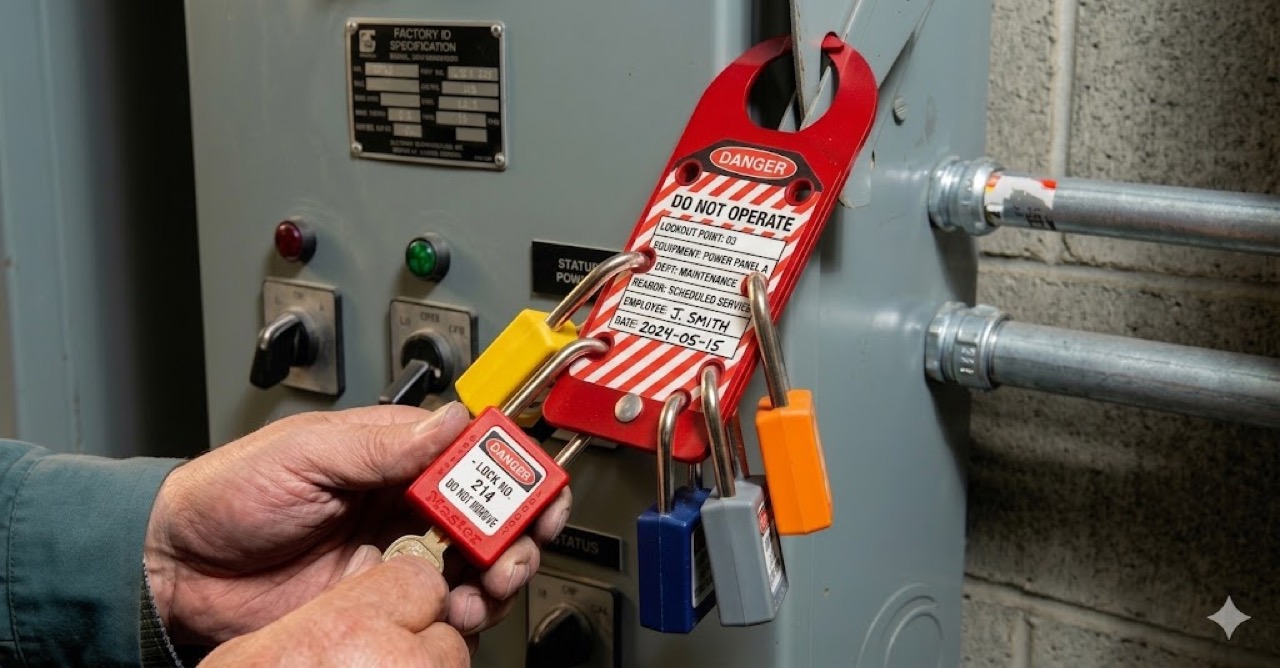
No prep on your side, no documentation project. You hand over what exists today: the SOP binder, the phone clips, the deck nobody has opened since 2022. You stay the source of truth, and nothing is published until you confirm the scope.
Standard Operating Procedure Health & Safety Dept.
Lockout Tagout 4.2
Doc No. LOTO-4.2
Rev. 3 - Eff. 01/2024
Page 1 of 1
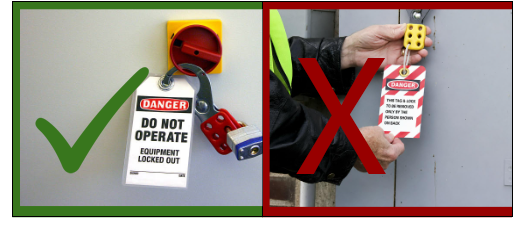
DO and DON'T Do Lockout Tagout
Fig. 1 - Correct (✓) vs. incorrect (✗) lockout/tagout
DO (Required Actions)
Identify all hazardous energy sources and locking mechanisms before starting.
Inform all affected personnel about the system shutdown, duration, and contact person.
Use your personal padlock and keep the key in your possession at all times.
Dissipate or neutralize all residual energies, such as pressure in lines or electrical charges in capacitors.
Attach a tag with your name, company, date, and reason for the lockout.
Verify isolation by attempting to restart the equipment before beginning work.
DON'T (Prohibited Actions)
Do not assume a machine is safe just because it is turned off; residual energy may still be present.
Do not use duplicates of lockout keys or share your personal key with others.
Do not open electrical panels or approach live work zones if you are an unqualified worker.
Do not remove another person's padlock unless following a documented emergency protocol and obtaining authorization.
Do not bypass lockout procedures unless specialized alternatives (like two-hand controls) are explicitly authorized.
Do not use improper equipment such as tie-wraps; only use proper lockout devices.
UNCONTROLLED WHEN PRINTED · verify current revision before use · F-4.2
You provide
Whatever you have: SOPs, clips, voice memos, slides, PDFs, plus your sites and languages.
TalentED does
We scope it with you and turn the raw material into clean transcripts, ready to produce.
Phase 2 / 6 TalentED
2 Build & migrate
We produce the first standardized courses and bring your existing library across - you start from everything you already have.
PPTX, PDF, MP4, SCORM. Your old library is not thrown out, it is standardized into clean, consistent courses with quizzes and certificates, in every language your floor needs. Each one comes back for your approval before it goes live.
First courses produced · existing library migrated for you to approve
You provide
Content to migrate (PowerPoint, PDF, video, SCORM) and a reviewer to approve each course.
TalentED does
We build the first standardized courses, migrate your library, and hand each back for approval.
Phase 3 / 6 IT · Optional
3 Connect your stack
Optional. If you want it, IT wires TalentED into the systems you already run. Skip it and you’re still fully up and running.
People sign in with the credentials they already have. Completion data flows back into your HR system automatically. Existing content from your previous LMS comes across standardized.
Identity, provisioning and your system of record - access stays where it belongs
You provide
An IT contact, your identity-provider details, and access to your HRIS or existing LMS.
TalentED does
We wire up SSO, migrate your existing content, and push completion data back into your HR system.
Phase 4 / 6 You
4 Build paths & assign
You decide what each role needs to learn. Build the path once, then deploy it to everyone who matches.
A line operator, a forklift driver, a new hire on day one: each role gets its own path, built once and assigned by site, role or language in a click. New people inherit the right training the moment they are added. You never assign course by course again.
Build once per role · one-click deploy to everyone who matches
You provide
A path per role, built once by you, and your map of roles to people.
TalentED does
Smart assignment routes each path to the right people by profile in one click, and new hires pick it up automatically.
Phase 5 / 6 Together
5 Multi-site go-live
When you’re ready, one standard goes out everywhere at once. Each site and subcontractor sees only what it should.
One source, every location, the same day. No per-site rebuild, no staggered rollout. Each plant, branch and subcontractor sees only its own scope, in its own language, while you watch completion roll in across the whole network from one place.
One standard out to every site, shift and language · scoped per portal
You provide
Your site and role map, and the go-ahead to publish.
TalentED does
We push one standard to every site, shift and language at once, with a scoped portal per site or subcontractor.
Phase 6 / 6 Ongoing
6 Stay current
Implementation doesn’t end at go-live. Update the source once and the whole system follows.
Change a procedure, hit update, and the affected segments rebuild and re-translate in every language within 48 hours, routed through your sign-off, then live to every worker. Anyone on the old version is flagged to re-train. No requeue, no quarterly release cycle, no drift.
Update the source once · every site refreshes within 48 hours, audit-signed
You provide
The updated source once, when a procedure or regulation changes.
TalentED does
Courses, in-task guides BETA, records and proof refresh within 48 hours, audit-signed, and anyone on the old version is flagged to re-train.
What we need from you
A short list to provide. And a longer one you don’t.
The lift on your side is small and front-loaded. Here’s everything we ask for - and everything you can stop worrying about.
What we need
Four things, and we run with them
✓Source material. Whatever already exists - SOPs, slides, PDFs, phone clips, voice memos. No need to script or polish it first.
✓An approver. One person who can review courses and sign off before they publish.
✓Identity-provider details (optional). Only if you choose to connect SSO and SCIM BETA - so IT can wire up access and provisioning.
✓Your site and role map. Which locations exist and which roles need which training - so paths and portals line up with how you actually operate.
What you don’t need
None of this is on you
×No L&D team. We produce the courses; you don’t staff a learning department to make this work.
×No video crew. A phone clip or a voice memo is enough raw material for us to produce from.
×No instructional designer on your side. The structuring, narration and assessment design are ours to handle.
Onboarding support
You’re not handed a login and left alone.
A named team runs the build and migration with you, and handles the practical details of getting training onto the devices your people actually carry.
Who you work with
An implementation lead owns your rollout end to end and stays your point of contact after go-live. Your IT contact pairs with our team for the stack connection; your approver reviews courses as we produce them. One team, start to current.
Devices, offline & caching
Training reaches the phone on the floor, the tablet in the field and the laptop at a desk. For spotty-connection sites, the mobile app caches courses so people can keep learning offline and sync when they reconnect. Mobile app + offline mode BETA is on its way - we’ll be straight about what’s ready for your fleet.
How migration is run
We bring your existing library across - PowerPoint, PDF, video and SCORM - rather than asking you to rebuild it. We bulk-import in batches, standardize as we go, and hand each course back for approval before it replaces the old one. Nothing goes live unreviewed.
Compare
Three ways to standardize training. One that actually ships.
In days, not quartersAny languageUpdated in 48 hoursAudit-ready
Build in-house
A stack of separate tools
TalentED
Time to first course
Months to quarters
You produce it
In days, not quarters
Internal team needed
L&D + video crew
Yes
None
Languages included
Add agency per language
DIY per language
Any language, translated
Update turnaround
Quarterly at best
You re-record
48 hours
Compliance toolkit
Bolt-on
Bolt-on
Built in
Learning Management System (LMS)
Build or buy it
Build or buy it
Included, branded
Ownership FAQ
Whose is it, really?
Who owns the courses and content you produce?
Your source material and learner data are yours, full stop. The course library we produce and finance as part of your subscription lives on the platform - current, version-locked, and audit-ready. It's yours to use throughout your agreement, and yours to export and take with you once the financed production is settled. The exact ownership and export terms are in your agreement.
Does TalentED replace our HR or ERP system?
No. Your HR/ERP stays the system of record for people. Integrations are mostly push - completion status flows from TalentED into your system; read-back only handles roles and departures at the edges.
Is training assigned automatically, without us deciding?
No. You build a course path per role yourself, then deploy it in one click to everyone who matches. Smart assignment routes the right path to the right people - but the paths and the decision to deploy are yours, not automatic.
What happens to our content when a procedure changes?
You update the source once. Courses, in-task guides, records and proof refresh within 48 hours, audit-signed, and anyone on the prior version is flagged to re-train. Every completion stays tied to the exact version taken.
How much of our own team does this take?
A small, front-loaded lift: source material, an approver, your identity-provider details, and your site/role map. No L&D team, no video crew, no instructional designer on your side - we produce the courses.
Where each phase lives
Every step maps to a part of the platform.
Implementation isn’t a separate product - it’s how you switch the platform on. Each phase connects to the capability that powers it.
Show us one process. We’ll sketch the rollout before the call ends.
“Excellence is teachable.”
Bring one procedure you’d want standardized. We’ll walk the phases against your own sites and languages, and show you what your first finished course would look like - in days, not quarters.